What Is Cross-Network in GA4? The Complete Guide to Decoding Performance Max and Demand Gen

If you have ever opened your GA4 acquisition report and stared at a row called Cross-network trying to work out what it actually means, you are not alone. It is the most misunderstood channel in the GA4 default channel group, and the source of more confused agency calls than any other line in the report.
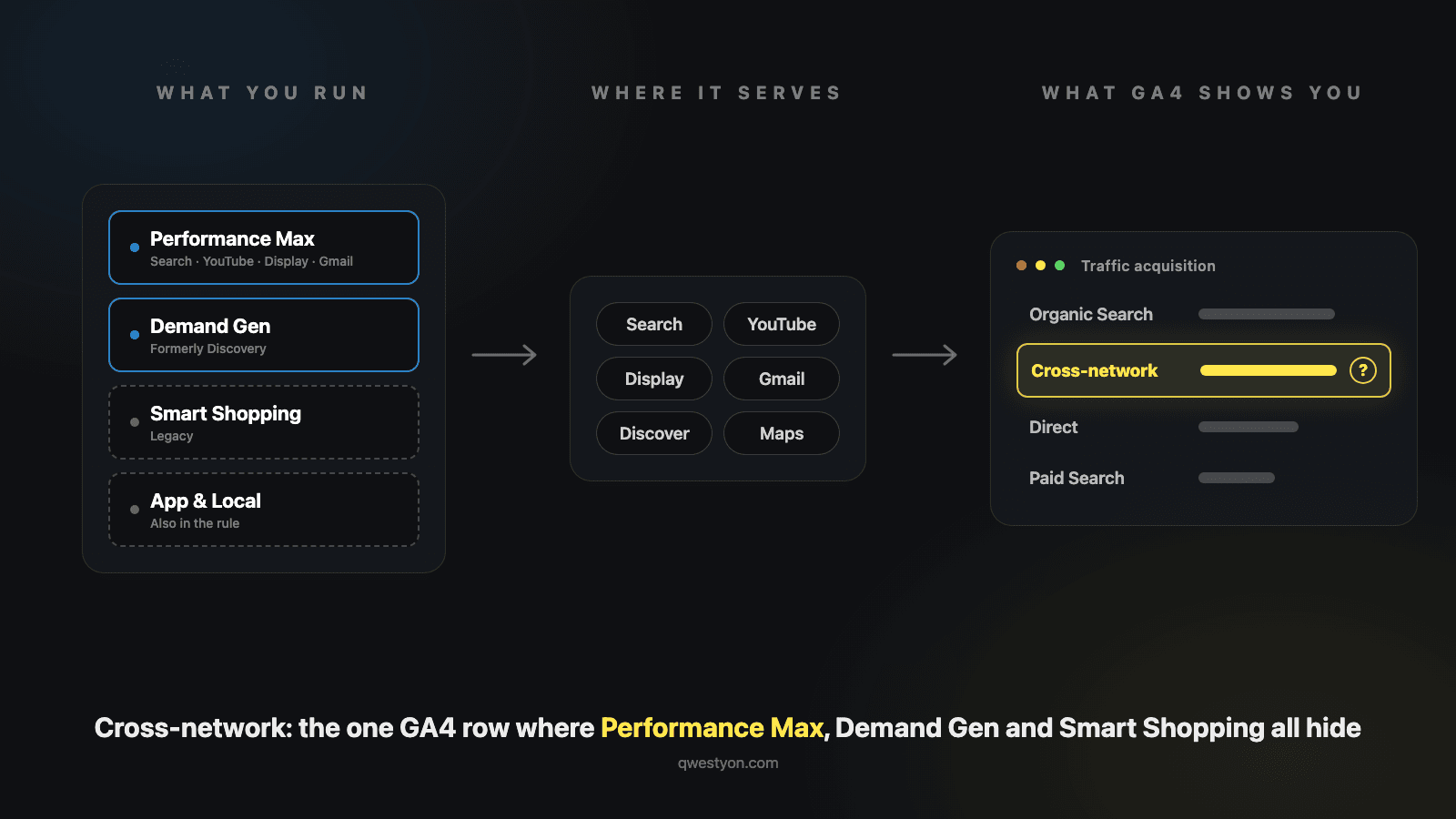
The short version: cross-network is where Google Analytics puts traffic from Google Ads campaigns that span multiple Google networks. Performance Max is the headliner. Demand Gen (formerly Discovery) and the legacy Smart Shopping campaigns are also there. Because a single one of these campaigns can serve a user an ad on YouTube, then in Gmail, then in Search results, GA4 cannot honestly say which network drove the click — so it bundles them all into one channel called cross-network.
That sounds reasonable on a slide. In practice it makes life difficult, because you cannot answer the question every operator wants to answer: was this revenue from Search, or from YouTube, or from the Discover feed?
This is the complete UK guide to cross-network in GA4 in 2026. What it is. What feeds it. Why Google built it that way. How to break it apart. The custom channel group workaround that turns it into something useful. And what changed with the Performance Max transparency updates earlier this year.
What is cross-network in GA4?
Cross-network is the default channel in Google Analytics 4 for Google Ads campaigns that run across several Google networks at once — Performance Max, Demand Gen and legacy Smart Shopping. Because one campaign can serve on Search, YouTube, Display, Gmail and Discover simultaneously, GA4 reports it all as a single Cross-network row rather than splitting it by network.
Google's own default channel group documentation calls it "traffic that arrives at your site or app via ads that appear on a variety of networks". True, but not much use at 9am on a Monday when someone asks what the row means. The practical definition:
Cross-network is the channel where GA4 puts traffic from Google Ads campaigns that the system cannot honestly attribute to a single network — because a single campaign was serving ads across several at once.
When you create a Performance Max campaign in Google Ads, you are not buying placements on Search or YouTube or Display. You are giving Google's automation a budget and a goal, and letting it serve impressions wherever its model thinks they will convert. A user might see your PMax video ad on YouTube, ignore it, see a Discovery card in their feed, ignore that too, then search for your product, click your PMax search ad, and convert.
To Google Ads' billing engine, that is one campaign. To GA4's channel grouping engine, the click that drove the session has source = google and medium = cross-network. The session lands in cross-network and stays there.
The same is true for Demand Gen, which Google rebranded from Discovery campaigns in late 2023. Demand Gen ads run across YouTube, Gmail, the Discover feed and YouTube Shorts. The campaign cannot be attributed to one of those. So it lives in cross-network.
Across Qwestyon's client accounts, cross-network drives roughly 30% of conversions from just 10% of the traffic — three times its session share. That mismatch is why the channel deserves serious attention: it is small in sessions and heavy in outcomes.
Cross-network across Qwestyon's client accounts
~30%
of conversions
Average share of conversions attributed to cross-network across accounts Qwestyon manages
~10%
of traffic
Average share of sessions the channel drives in the same accounts
3x
its traffic share
Cross-network converts at roughly three times the rate its session share implies
What GA4 collapses into one row
Multi-network campaign types serve wherever Google's automation decides — GA4 reports the lot as a single channel.
What you run in Google Ads
Performance Max
The dominant source in most accounts
Demand Gen
Formerly Discovery
Smart Shopping
Legacy — replaced by PMax in 2022
App
App install and engagement campaigns
Smart
Legacy automated SME campaigns
Local
Legacy — folded into PMax
Where those ads actually serve
The one row GA4 gives you back
Cross-networksource = google · medium = cross-networkWhich campaign types feed Cross-Network?
Google's machine rule for the channel is broader than most write-ups admit. A session classifies as cross-network when the source platform is Google Ads and the ad network type is "Cross-network" or "Google owned channels" — or when the campaign type is any of Performance Max, Demand Gen, App, Smart or Local. Legacy Smart Shopping campaigns land here too.
| Campaign type | Status in 2026 | Networks it runs across |
|---|---|---|
| Performance Max | Active, dominant | Search, YouTube, Display, Gmail, Discover, Maps |
| Demand Gen (formerly Discovery) | Active, growing | YouTube in-feed, YouTube Shorts, Gmail, Discover feed |
| App | Active | Search, Google Play, YouTube, Display |
| Smart Shopping | Sunset — replaced by PMax in 2022 | Was Search + Display + YouTube + Gmail |
| Smart | Legacy | Automated campaigns across Google surfaces |
| Local | Sunset — folded into PMax | Was Search, Maps, Display, YouTube |
| DV360 / SA360 cross-network buys | Active, enterprise | Cross-channel campaigns booked outside Google Ads |
Most guides stop at the first three rows. App, Smart and Local are in Google's official rule as well — which matters if you run app campaigns, because those installs and sessions share a row with your PMax spend.
In nearly every SME account we audit, though, cross-network effectively means Performance Max. If you run no Demand Gen and no app campaigns, your cross-network row is your PMax row. That one substitution answers most of the confusion on its own.
If you need a refresher on PMax itself, Google's Performance Max steering and reporting updates page covers what the campaign type actually does. For the channel grouping side, Analytics Mania's deep dive on default channel groups is the most thorough public reference.
Why do I see cross-network if I don't run Google Ads?
This is the question that fills Google's own support forums. A site that has never spent a pound on Google Ads opens Traffic acquisition and finds a Cross-network row staring back. The channel is rule-based, so something is writing those source and medium values into your traffic. In practice it is one of four things:
- Someone is running ads you do not know about — an agency, a franchise partner, a marketplace reseller, or an old freelancer whose account access never got cleaned up. Check Admin → Product links → Google Ads links before assuming a tracking bug.
- A media partner is buying through Display & Video 360 or Search Ads 360. Those buys classify as cross-network too, and the Source platform dimension exposes them in one click.
- Mis-tagged links. The medium value
cross-networkis just a string, so if an email tool, affiliate or partner site writes it into a UTM, GA4 obeys. Drill into Session source / medium and the fake rows give themselves away. - Spam or bot traffic replaying tagged URLs. Rare, but real. The tell is sessions with zero engagement time landing on pages you never advertised.
Work through those in order and the mystery usually dies at step one or three. If the traffic still looks unexplained, check whether the sessions carry a gclid (a real Google Ads click ID) or just a hand-written UTM. Only the first means actual ad spend somewhere.
Why Google built it this way (and what it costs you)
The cross-network channel exists for a defensible reason. When PMax campaigns serve ads across six Google properties simultaneously, there is no truthful way to attribute a single session to one of them. A user does not click an ad on "YouTube" — they click an ad that ran in a placement that was sold by an algorithm that distributed budget across YouTube, Search, Display, Gmail and Discover at the same time. Forcing GA4 to pick one would create false precision.
Cross-network is GA4 acknowledging that the question "which Google network did this conversion come from?" is not always answerable.
That is the principled defence. The practical reality is that cross-network is the most opaque channel in the default group, and the opacity is doing a lot of strategic work for Google. You can no longer answer some of the questions that operators care about most.
What cross-network captures vs what it hides
What you CAN see
- Total sessions, conversions and revenue from PMax + Demand Gen
- The campaign name driving traffic (via secondary dimension)
- Source platform (Google Ads, SA360, DV360)
- Landing pages where cross-network traffic arrives
- On-site behaviour: bounce rate, engagement, conversion rate
- Trend over time — week-over-week and month-over-month
What you CANNOT see
- Which Google network (Search, YouTube, Display, Gmail) drove the click
- Whether revenue is incremental or cannibalised brand search
- Asset-group-level performance from inside GA4
- Whether the click was on a branded query or a generic one
- Whether the placement was an in-stream YouTube ad or a Discover card
- Whether the conversion was view-through or click-through
The right column is the heart of the operator complaint. Without those data points you cannot tell whether your PMax campaign is genuinely growing the business or simply taking credit for sales that would have happened through brand search anyway. We will return to this — the cannibalisation question — later in the guide. First, let us cover where to actually find the data.
How to find Cross-Network data in GA4
There are three places cross-network data lives in GA4. Each shows a slightly different view, and knowing which one to trust for which question saves a lot of confusion.
1. Reports → Acquisition → Traffic acquisition. This is the most-used view. It shows sessions and conversions by Default channel group. The cross-network row is your top-level number.
2. Reports → Acquisition → User acquisition. Same data, but credited to the channel that first brought a user to the site, not the channel of the most recent session. PMax often shows higher numbers here because it captures users at the top of the funnel and they return through other channels later.
3. Advertising → Performance → All channels. The advertising workspace. Uses the same channel grouping but applies your selected attribution model (last-click, data-driven, etc). This is where you compare how cross-network's contribution shifts under different models.
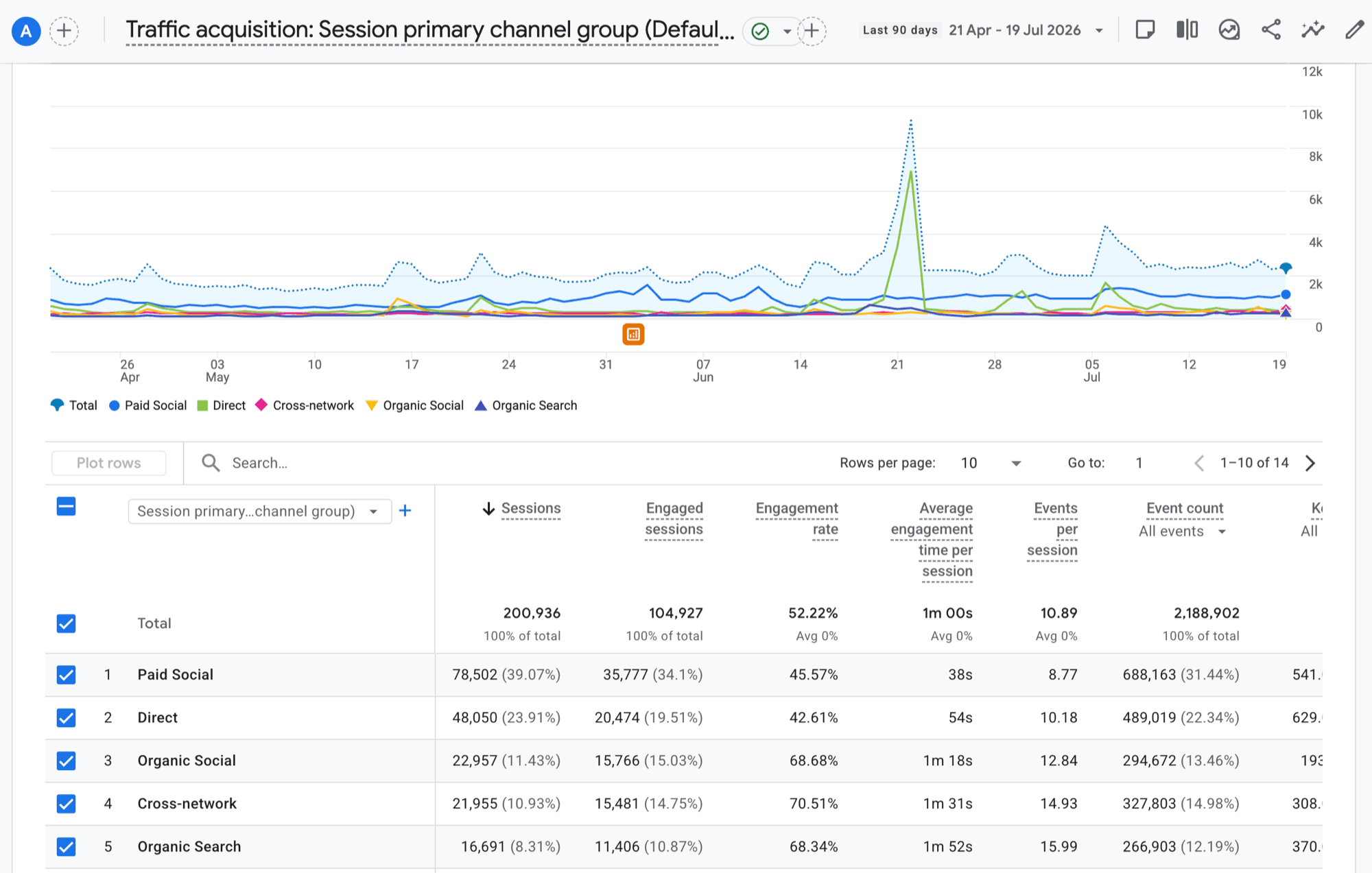
That is a real managed account over 90 days. Two things worth noticing: cross-network sits fourth by sessions at about 11% of traffic, and its engagement rate (70.5%) comfortably beats the site average (52.2%). PMax traffic is not junk traffic — it is just badly labelled.
The most underused dimension in the entire cross-network conversation is Source platform. It tells you which Google ad platform booked the spend (Google Ads, Search Ads 360, Display & Video 360). For a UK SME running everything in Google Ads, source platform will always say "Google Ads" — but if you ever expand into SA360 or DV360, it becomes the only way to tell those campaigns apart inside GA4.
The 60-second drill-down
When someone asks "what is in cross-network this month?", here is the fastest possible answer:
- Reports → Acquisition → Traffic acquisition
- Click the cross-network row to filter to it
- Change the primary dimension to Session campaign
- You now see every PMax and Demand Gen campaign by name, with sessions, engagement and conversions
- Add Landing page or Source platform as a secondary dimension if you need more
That is it. Three clicks and the opaque channel becomes a campaign-level breakdown.
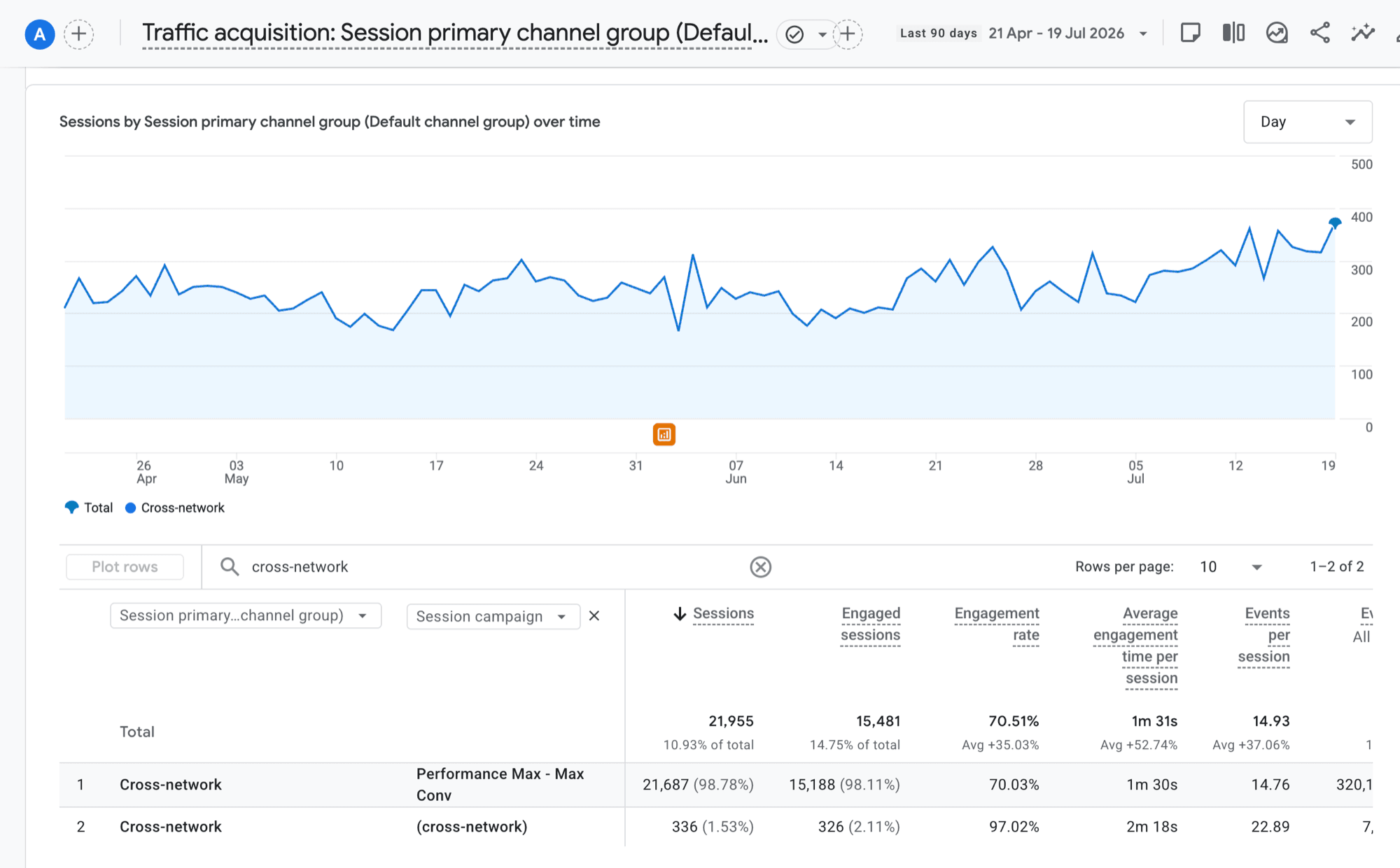
Here is that drill-down on the same account: one Performance Max campaign accounts for 98.8% of every cross-network session. The opaque row is, in practice, a single campaign wearing a channel's name.
How to break Cross-Network down by underlying network
Drilling by campaign tells you which PMax campaign drove the traffic. It does not tell you which Google network served the click. That information is partly available, partly inferred, and partly impossible.
What you can see directly
GA4's Source platform dimension tells you the booking platform but not the placement network. Session campaign tells you the named PMax or Demand Gen campaign. Landing page tells you which page the user arrived on, which can hint at intent.
What you can infer
Pair GA4 cross-network sessions with the Performance Max placement report inside Google Ads (which got a major upgrade in February 2026 — more on that shortly). Cross-reference dates and campaign IDs and you can build a rough split of where PMax served impressions during the period. It is not perfect — Google Ads placement reports do not 1:1 reconcile with GA4 sessions — but it is the closest you will get without paid attribution tooling.
What is genuinely impossible inside GA4 alone
You cannot, today, see in a GA4 standard report that "this PMax-driven session came from a YouTube in-stream ad" versus "this one came from a Discovery feed card." That granularity is not exposed. To get it you need either a third-party attribution platform (Northbeam, Triple Whale, Measured) or the Google Ads Data Hub for enterprise advertisers.
For most SME operators, the practical answer is: live with the blended cross-network total, drill by campaign, cross-reference Google Ads when needed, and stop trying to manufacture precision the data does not support.
Why don't cross-network numbers match Google Ads?
They never will, and chasing a perfect match wastes afternoons. The two platforms count different things:
- Attribution model. GA4 standard reports use data-driven attribution across every channel. Google Ads gives its own campaigns full credit under its own model. The same conversion gets sliced differently in each.
- Report dates. Google Ads books a conversion against the date of the click. GA4 books it against the date it happened. A Tuesday click that converts on Friday lands in different columns in each tool.
- What gets counted. Google Ads can include view-through and modelled Enhanced Conversions. GA4 counts the key events your property tracks. These are different measures wearing the same name.
- What gets lost. Consent banners, ad blockers and browser tracking prevention thin GA4's view of paid sessions before attribution even starts.
- What is in the row. The GA4 cross-network row pools PMax, Demand Gen, app campaigns and the rest. Comparing it to a single PMax campaign in Google Ads is a category error.
Reconciliation write-ups across the analytics industry put the routine gap at 20–30%, which matches the mechanics above. The version of reconciliation that works: pick one conversion action, set both tools to the same attribution model and date basis, compare a full month, and note the residual gap. Then track the trend of that gap rather than re-litigating it every month. If it suddenly widens, something broke. If it holds steady, that is just measurement being measurement.
The cannibalisation problem nobody talks about
This is the most important section in this guide. Skip the others if you have to — read this one.
A meaningful share of cross-network revenue is brand search traffic that PMax is taking credit for. PMax is allowed to bid on branded queries unless you explicitly exclude them via brand exclusion lists. When a user types your brand name into Google, sees a PMax ad and clicks it, that click — and the resulting conversion — gets attributed to cross-network in GA4. The user would have found you anyway through the organic listing or by typing your URL directly.
You are paying for traffic that was already yours. And it is hiding inside the cross-network row because the brand portion of PMax cannot be separated from the rest.
The signs that this is happening in your account:
- Cross-network sessions and conversions both jumped sharply when you launched PMax — but total site revenue did not move proportionally
- Your direct and organic search sessions dropped by roughly the amount cross-network grew
- Your Google Ads cost went up with no corresponding lift in incremental new customers
- Your blended MER (which we covered in the MER guide) flattened or fell while channel-reported ROAS looked great
The fix is to set up brand exclusion lists in your Performance Max campaigns. Add your brand name and common misspellings to the brand exclusion list inside Google Ads. PMax will then route those queries elsewhere — usually to your standard brand search campaign at much lower CPC — and your true incremental cross-network revenue becomes visible.
What changed with cross-network in 2026
The channel definition has not moved: still source = google, medium = cross-network. What feeds it, and how much you can see inside it, moved a lot:
- February 2026 — PMax placement transparency. The "Where ads showed" report now populates for Performance Max, split by network. You can finally see where PMax spent the money inside Google Ads, even though GA4 still shows one row.
- Search terms visibility. PMax now shows the search terms triggering its ads, and you can add negatives straight from the report.
- Negative keywords up to 10,000 per PMax campaign. Brand exclusion at scale went from wishlist to shipped.
- Demand Gen replaced Discovery, and parked domains left the Search Partner Network for good on 10 February 2026 — a long-running source of junk cross-network traffic, gone.
- The default channel group now includes an "AI Assistants" channel for traffic from tools like ChatGPT. Separate from cross-network, but proof the groupings keep moving.
If your last serious look at PMax predates these, the diagnostic toolkit has changed enough to justify a fresh audit.
Should you build a custom channel group?
For most accounts spending over £2,000/month on PMax or Demand Gen, yes. The custom channel group is the single best workaround GA4 offers for the cross-network opacity problem.
A custom channel group lets you define your own channels with your own rules. You can create a discrete "Performance Max" channel and a separate "Demand Gen" channel, both pulling from cross-network, so they no longer share a row in your reports. The default channel group still exists alongside it — you just gain a second view that is more useful.
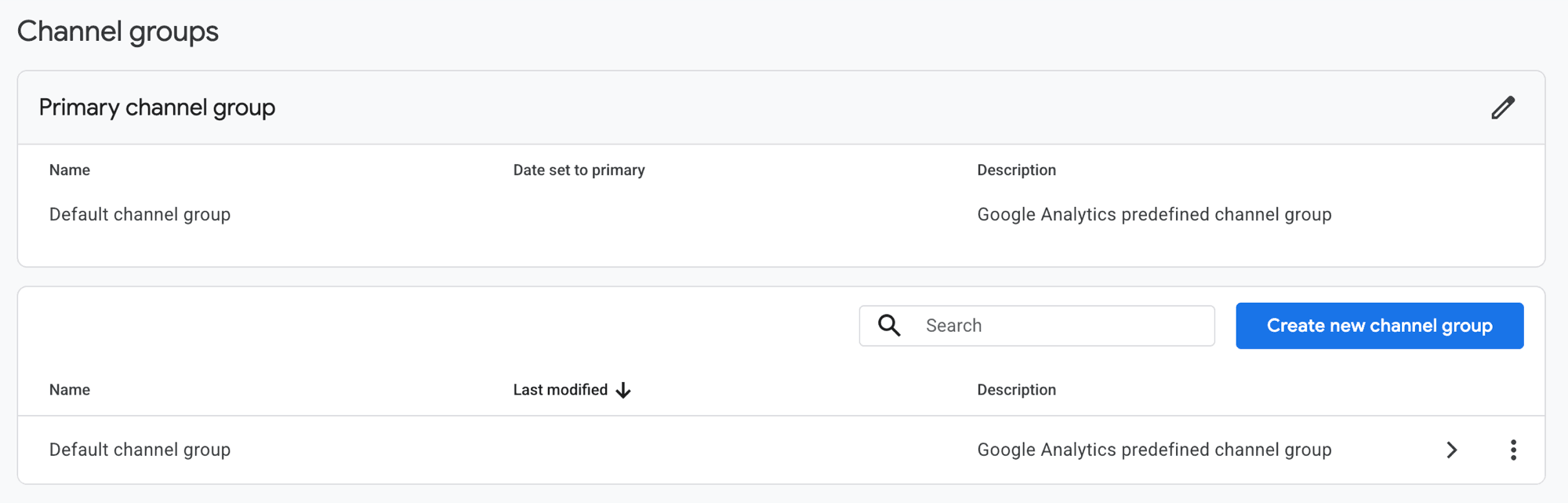
This is the screen you are heading for (Admin → Data display → Channel groups):
How to build a Cross-Network-aware custom channel group in GA4
- 1
Step 1 — Open Admin → Channel groups
In your GA4 property, navigate to Admin and find Channel groups under Data display. Click Create new channel group.
- 2
Step 2 — Name it sensibly and clone the default
Name it something like Operator channel group. Clone the default group as a starting point so you do not have to recreate the other default channels from scratch.
- 3
Step 3 — Add a Performance Max channel
Create a new channel called Performance Max. Set the rule to Session campaign matches regex .*pmax.* OR Source platform = Google Ads AND Medium = cross-network AND Session campaign does NOT contain demand. Adjust to match your campaign naming convention.
- 4
Step 4 — Add a Demand Gen channel
Create a Demand Gen channel with the rule Session campaign contains demand OR Session campaign contains discovery. This catches both renamed and pre-rename campaigns.
- 5
Step 5 — Order the rules carefully
Channel rules are evaluated top to bottom. Place your new Performance Max and Demand Gen channels ABOVE Cross-network so they catch the traffic first. Anything that does not match either still falls into Cross-network.
- 6
Step 6 — Save and verify in Explorations
Save the group. Open an Exploration, set Dimension = Custom channel group [name] and verify your new channels are populating with the right campaigns. Reports will start using the new group within 24 hours.
The catch: custom channel groups are forward-looking only in some reports. The Acquisition reports apply them to historical sessions, but Explorations sometimes need a fresh date range to populate properly. Build the group, then revisit it 48 hours later for a clean read.
Same mechanism, different job: the walkthrough above splits paid Google traffic. If what you want instead is channel groups for AI referrals — ChatGPT, Perplexity, Copilot — our custom channel group guide for AI traffic runs the same build for that use case.
Cross-Network vs Paid Search vs Paid Shopping
The single most common mistake we see in client GA4 audits is operators confusing these three channels. They are distinct. Knowing which is which fixes a lot of attribution arguments before they start.
| Channel | What feeds it | Source/Medium signature | Typical campaigns |
|---|---|---|---|
| Cross-network | Multi-property Google Ads campaigns | source=google, medium=cross-network | Performance Max, Demand Gen, Smart Shopping (legacy) |
| Paid Search | Standard Google Ads search campaigns | source=google, medium=cpc + non-shopping campaign | Standard Search campaigns, brand search campaigns |
| Paid Shopping | Standard Shopping campaigns | source=google, medium=cpc + shopping campaign name | Standard Shopping (not Smart Shopping or PMax) |
| Paid Video | Standard YouTube campaigns | source=youtube/google, medium=cpc/cpv + video campaign | Standalone Video Action, In-stream campaigns |
| Display | Standard Display campaigns | source=google, medium=display/cpc + Display campaign | Standalone Display campaigns |
| Paid Other | Paid traffic GA4 cannot categorise | Various — usually broken UTMs | Misconfigured non-Google paid campaigns |
If you launched a campaign in Google Ads and you are not sure which channel it should appear in, the rule is simple: standard campaign types follow their network's medium; multi-network campaign types (PMax, Demand Gen) collapse into cross-network. If you see PMax revenue in Paid Search, your channel grouping has been customised — check Admin → Channel groups.
Common mistakes when reading cross-network data
Cross-network analysis hygiene
- ✓You are not double-counting cross-network revenue against paid search revenue when reporting
- ✓You have checked that PMax brand exclusions are in place to limit cannibalisation
- ✓You are using the same attribution model in Google Ads and GA4 (or you know they differ and have explained why)
- ✓You compare cross-network trends year-over-year, not just month-over-month, to account for seasonality
- ✓You have segmented cross-network by campaign at least once to confirm what is actually inside it
- ✓You know whether your account is running Demand Gen as well as PMax — not just one or the other
- ✓You understand that cross-network conversions in GA4 may not match Google Ads conversions and you have a reconciliation method
- ✓You are not making budget decisions on cross-network ROAS alone without checking blended MER
How to use cross-network data well: the 5-step operator workflow
If you take one workflow away from this guide, take this one. It is what we walk client teams through in their first month of working with us.
The 5-step cross-network workflow
- 1
Step 1 — Audit what is feeding cross-network this month
Filter to the cross-network row in Traffic acquisition, switch primary dimension to Session campaign, and write down which PMax and Demand Gen campaigns are driving traffic. If you see campaigns you did not know were running, fix that first.
- 2
Step 2 — Set brand exclusions in PMax
Go into each Performance Max campaign in Google Ads and add your brand and common misspellings to the brand exclusion list. This is non-optional in 2026 — without it, a portion of cross-network revenue is brand search you are paying for twice.
- 3
Step 3 — Run a brand-search holdout test
Pause your standard brand search campaign in 3 matched UK regions for 2 weeks. Measure whether cross-network revenue in those regions absorbed the lost brand spend. This tells you how much of cross-network is genuinely incremental.
- 4
Step 4 — Build a custom channel group
Use the steps above to create discrete Performance Max and Demand Gen channels. From now on you can read PMax revenue separately from Demand Gen revenue without exporting raw data.
- 5
Step 5 — Reconcile against blended MER monthly
Cross-network ROAS will look great. Your Marketing Efficiency Ratio (total revenue ÷ total marketing spend) will not lie. If MER is flat while cross-network ROAS climbs, the channel is being credited for sales it did not create. Trust MER, not the channel.
If you want the full picture on how to read MER properly, our MER ultimate guide covers the formula, the break-even maths and the seven levers that actually move the metric. For the channel-level companion view, the 2026 UK ROAS benchmarks guide is the natural pair to this article.
If you suspect Performance Max is eating your search-terms transparency more broadly, our guide on missing search terms in Google Ads covers the related diagnostic for the standard Search campaign type.
The honest summary
Three things to remember when you next look at cross-network in GA4:
- Cross-network is mostly Performance Max for nearly every UK SME advertiser. Demand Gen is the second contributor. Smart Shopping is gone. If you mentally substitute "PMax" for "cross-network", you will be right far more often than not.
- The opacity is real, but workable. GA4 cannot tell you which Google network drove the click. You can drill by campaign, source platform and landing page to answer most operator questions. For the rest, use Google Ads' improved 2026 placement and search terms reports.
- Cross-network revenue can be misleading. A meaningful share of it is often brand search PMax is taking credit for. Set brand exclusions, run a brand-search holdout test, and trust your blended MER over channel-reported ROAS.
The platforms keep getting smarter at attribution. The honest operator response is to keep getting smarter at not believing them — and using metrics that cannot be gamed when the stakes are real.
Sources
- GA4 default channel group definitions — Google Analytics Help
- New Performance Max steering and reporting updates — Google
- Google adds search terms visibility to Performance Max — Search Engine Land
- Google Ads PMax placements report, 2026 update — Digital by Marketing
- Default channel group in Google Analytics 4 — Analytics Mania
Related guides
- Marketing Efficiency Ratio (MER): what it is and why it matters
- What is a good ROAS for Google Ads in the UK? 2026 benchmarks
- Google Ads search terms missing: where the data went
- How to track AI traffic in GA4 using custom channel groups
- The Performance Max channel report, explained
- Performance Max vs Search for small business
Frequently asked questions
Cross-Network in GA4 — common questions
What is cross-network in GA4?
Cross-network is a default channel grouping in Google Analytics 4 that captures traffic from Google Ads campaigns running across multiple Google properties at once. Performance Max is the dominant source, but it also includes Demand Gen (formerly Discovery) and the legacy Smart Shopping campaigns. The defining technical condition is source = google and medium = cross-network.
Which campaign types count as cross-network in GA4?
More than most guides list. Google's official rule classifies a session as cross-network when the campaign type is Performance Max, Demand Gen, App, Smart or Local, or when the Google Ads ad network type is Cross-network or Google owned channels. Legacy Smart Shopping campaigns land here too, as do cross-network buys booked through Display & Video 360 or Search Ads 360.
Is cross-network the same as Performance Max?
No, but PMax is the largest contributor for most accounts. Cross-network is the channel; PMax is one of several campaign types that feed it. Demand Gen and Smart Shopping also flow into cross-network. If you want to know specifically how PMax is performing, filter the cross-network channel by campaign name or source platform inside GA4 reports.
Why does Performance Max show up as cross-network instead of paid search?
Because a single PMax campaign can serve a user a YouTube ad, then a Search ad, then a Display retargeting impression — sometimes in the same session. GA4 cannot honestly attribute that session to one network, so it routes the entire campaign to cross-network. Even when a PMax click happens on google.com, the medium is still cross-network, not cpc.
Why do I see cross-network in GA4 if I don't use Google Ads?
Usually one of four things: ads being run on your behalf that you do not know about (an agency, partner or old freelancer with account access), a media buy through Display & Video 360 or Search Ads 360, links mis-tagged with medium = cross-network by an email tool or affiliate, or bot traffic replaying tagged URLs. Check Admin → Google Ads links first, then drill into Session source / medium to spot the fake rows.
How do I see what is inside cross-network in GA4?
Go to Reports → Acquisition → Traffic acquisition. Find the cross-network row. Add a secondary dimension (campaign, session source/medium, or source platform) to break it apart. For more flexibility, build an Exploration with cross-network as the filter and slice it by campaign and source platform. The Source platform dimension is the most useful — it tells you whether traffic came from Google Ads, Search Ads 360, or Display & Video 360.
Should I create a custom channel group to split cross-network apart?
Yes, if you spend meaningfully on PMax and Demand Gen. A custom channel group lets you create discrete channels for Performance Max and Demand Gen so they no longer hide inside cross-network. The trade-off is that custom channel groups are not retroactive in some reports and they sit alongside the default group rather than replacing it. Most operators set them up once and never look back.
Why does cross-network show more conversions than Performance Max shows in Google Ads?
Three usual reasons. First, attribution model differences — GA4 may be using data-driven attribution while you are reading last-click in Google Ads. Second, conversion lag — GA4 reports conversions on the date of the conversion, Google Ads reports them on the date of the click. Third, Demand Gen and Smart Shopping campaigns also feed cross-network, so the channel total is higher than any single PMax campaign in isolation.
How do I get rid of cross-network in GA4 reports?
You cannot delete a default channel, but you can stop it dominating your reports. In Traffic acquisition or any standard report, use the filter to exclude the cross-network channel. In Explorations, add cross-network as a Not-Match filter on the Default channel group dimension. The cleaner long-term fix is a custom channel group that splits Performance Max and Demand Gen into their own rows, so the traffic stays visible without swamping everything else.
What is the difference between cross-network and paid other in GA4?
Cross-network is specifically for Google Ads campaigns running across multiple Google properties (PMax, Demand Gen, Smart Shopping). Paid Other is the catch-all bucket for paid traffic that GA4 cannot categorise as Search, Social, Shopping or Video — usually because the UTM parameters are wrong or non-Google paid sources have unusual mediums. If you see a lot of Paid Other you have a UTM hygiene problem, not a cross-network one.
Written by
Adam Rodell
Founder of Qwestyon, a Brighton-based digital marketing studio. Adam runs paid search and paid social for UK businesses and publishes original research on Generative Engine Optimisation, including the schema and AI-search audits on this blog.